
Fieldbus training for LabVIEW and DIAdem users
Understanding fieldbuses – and using them in your own application
Anyone connecting test benches, measurement systems or controllers to fieldbuses with NI LabVIEW or NI DIAdem needs more than a working interface: only an understanding of topology, telegrams, device descriptions and configuration makes commissioning, troubleshooting and extensions manageable.
Our fieldbus training courses combine the fundamentals of the respective bus with hands-on practice on Hilscher hardware (cifX PC cards and netHOST gateways) and integration into your LabVIEW or DIAdem application – on request directly with the devices from your project.
Who is it for?
- Developers of LabVIEW and DIAdem applications
- Test bench and test engineers
- Commissioning and service staff
- Teams integrating fieldbus devices into existing test and measurement systems
Structure of a training course
Each course follows a proven sequence that is adapted to the respective bus and your application:
- Bus fundamentals: classification, topology and physics, telegram structure, addressing, state machines, diagnostics and error handling
- Device descriptions and profiles: EDS, GSDML, ESI or GSD – structure, import and adaptation, process data mapping
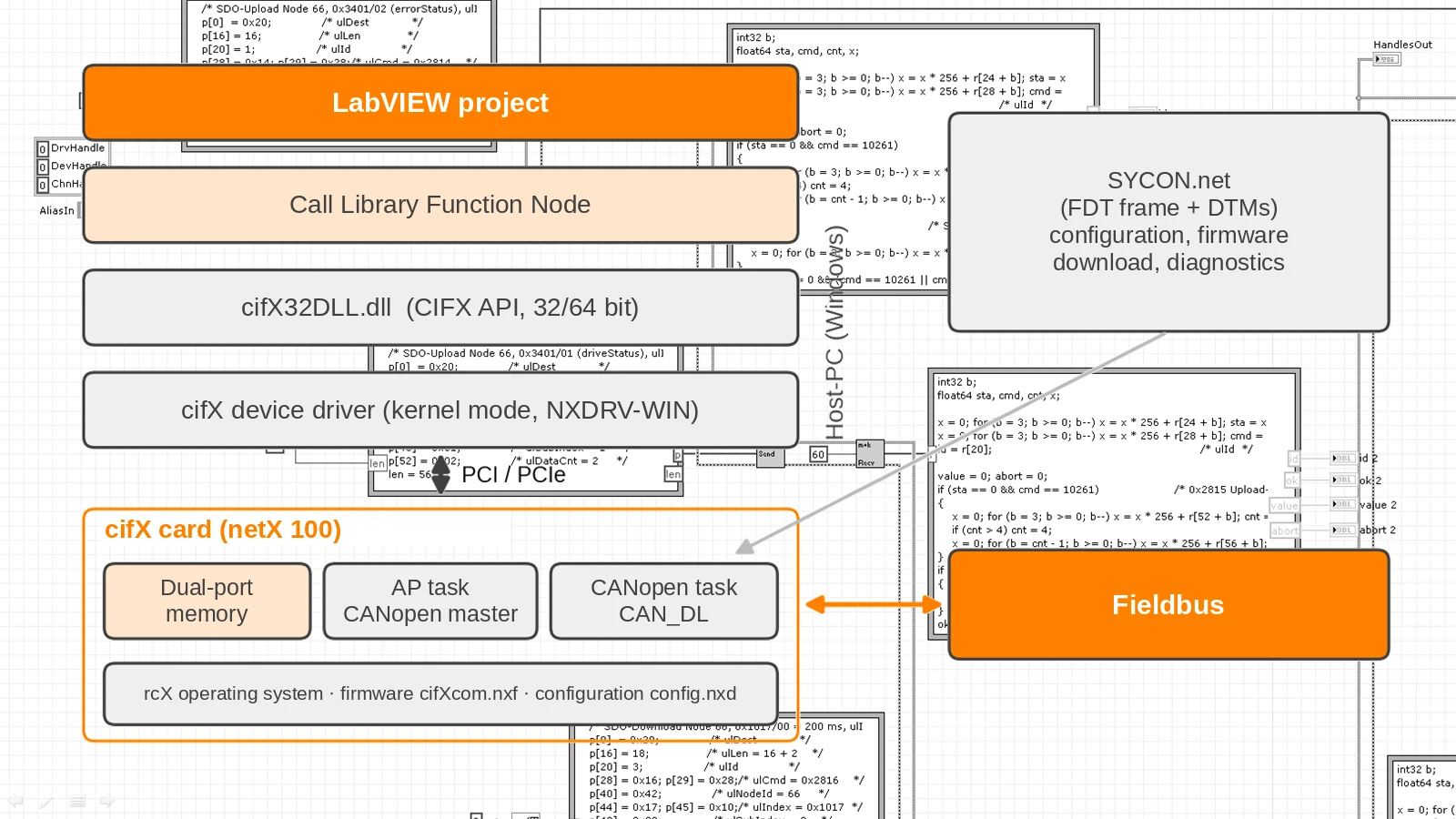
- Hilscher hardware: the cifX card concept for all protocols, netHOST gateways, dual-port memory, particularities of multi-bus capability
- Software and tools: driver installation, firmware, configuration with SYCON.net or communication Studio, step-by-step commissioning
- Integration into LabVIEW and DIAdem: cyclic and acyclic communication with our LabVIEW libraries and DIAdem drivers, status monitoring, error handling
- Hands-on part: controlling real devices – e.g. a drive – on our training setup or with your own hardware
Bus protocols
We provide training for all protocols supported by the Hilscher cards and gateways:
- Real-time Ethernet: PROFINET IO (controller / device), EtherCAT (master / slave), EtherNet/IP (scanner / adapter), Sercos (master / slave), POWERLINK (controlled node), Modbus/TCP, CC-Link IE Field Basic, VARAN
- Classic fieldbuses: PROFIBUS DP (master / slave), CANopen (master / slave), DeviceNet (master / slave), CC-Link (slave)
Together with you, we clarify in advance which role and firmware are available for your hardware.
Training formats
- at your premises, at our office or remotely
- basic or advanced training, single buses or several in comparison
- typical duration: 1 to 3 days, depending on scope and hands-on share
- individually tailored to your devices, your tasks and your level of knowledge
Bus-specific topics (examples)
- CANopen: object dictionary, SDO and PDO, PDO mapping, NMT and heartbeat, LSS, SYNC and EMCY
- PROFINET: IO controller and IO device, GSDML, cycle times, alarms, acyclic data records
- EtherCAT: master and slave, ESI files, process data and CoE, states INIT to OP, distributed clocks
- EtherNet/IP: scanner and adapter, implicit and explicit messaging, CIP objects
- PROFIBUS DP and DeviceNet: master/slave communication, GSD or EDS, cyclic and acyclic data exchange
- Sercos, POWERLINK, Modbus/TCP, CC-Link: principles, configuration and integration as required
Contact
If you have any questions about training content and procedures, to discuss suggested topics or to request a quote, please contact our training manager Holger Müller by telephone on +49 160 / 287 7294 or by e-mail at mueller@mueller-krahmer.de.